Aria for delivery teams

Less chasing and easier admin, without taking judgement away from people
Aria connects projects, people, time and money so the records your team needs sit closer to the work you are doing. Check suggested time entries, find shared project context and help the people planning work see when commitments clash. You review the record and submit your own timesheet.
14 days to explore Aria · No credit card required

What changes for the people doing the work
Check a suggested time entry instead of starting from a blank week and hoping Monday comes back to you.
Use shared tasks, milestones and recorded project context to understand the next piece of work.
See how booked work compares with your available time, so you can flag an overloaded week before it means working late.
Useful at the points where the week changes

When you are picking up the next task
A shared plan gives you and your PM somewhere to check the agreed work and upcoming milestones. Less of the context has to be reconstructed from the last meeting.

When you have moved between projects
A meeting, a change of priority and a couple of urgent tasks can make the week difficult to remember. Suggested entries give you clues to check, not a supposedly perfect account of the day.
When two commitments need the same hours
The scheduling picture helps your PM or delivery lead see what has been booked and discuss what needs to change. The warning is about the plan; it is not a judgement about whether you are working hard enough.
Sound familiar

The admin arrives after a day already full of work
You have finished the meeting, dealt with the request and moved the task on. Now three different places want an update about it.

The timesheet remembers the meeting but not what happened around it
Your calendar gives you part of the story. It does not know that the call finished early, the follow-up took longer or another project interrupted the afternoon.

Two deadlines have quietly become your problem
Both plans look reasonable until you are the person expected to do the work for both. Somewhere between the schedules, the same hours have been spent twice.
A useful system should help the team make sense of the work. The records matter, but they should have a purpose you can recognise beyond filling in another report.
A better starting point for your record and your team
Aria is agency management and PSA software for agencies and consultancy firms. It brings recorded project activity, time and capacity into a shared picture, so teams and the people planning their work have more useful context to discuss.
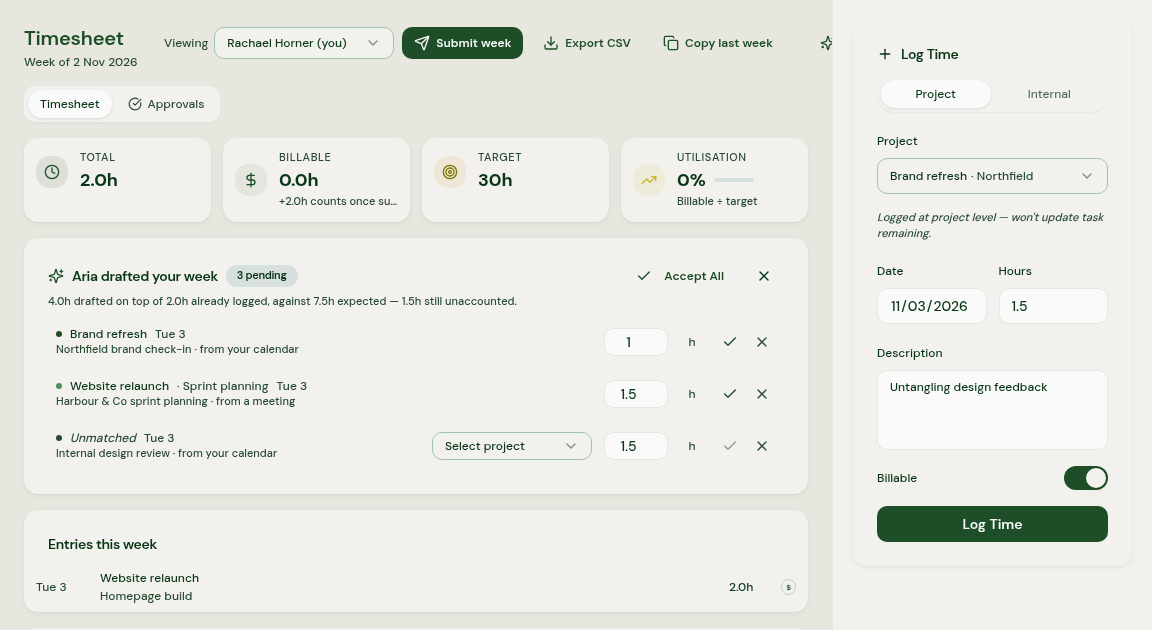
Your week comes with suggestions you can correct
Aria suggests time entries from supported calendars, recorded meetings, assigned tasks and timers, with confidence indicators. Check the hours, task, project and billable status, add missing work and save the entries you want to record.
Then submit your own timesheet. A meeting is a clue, not proof of how much work was done, and Aria does not submit the timesheet for you.
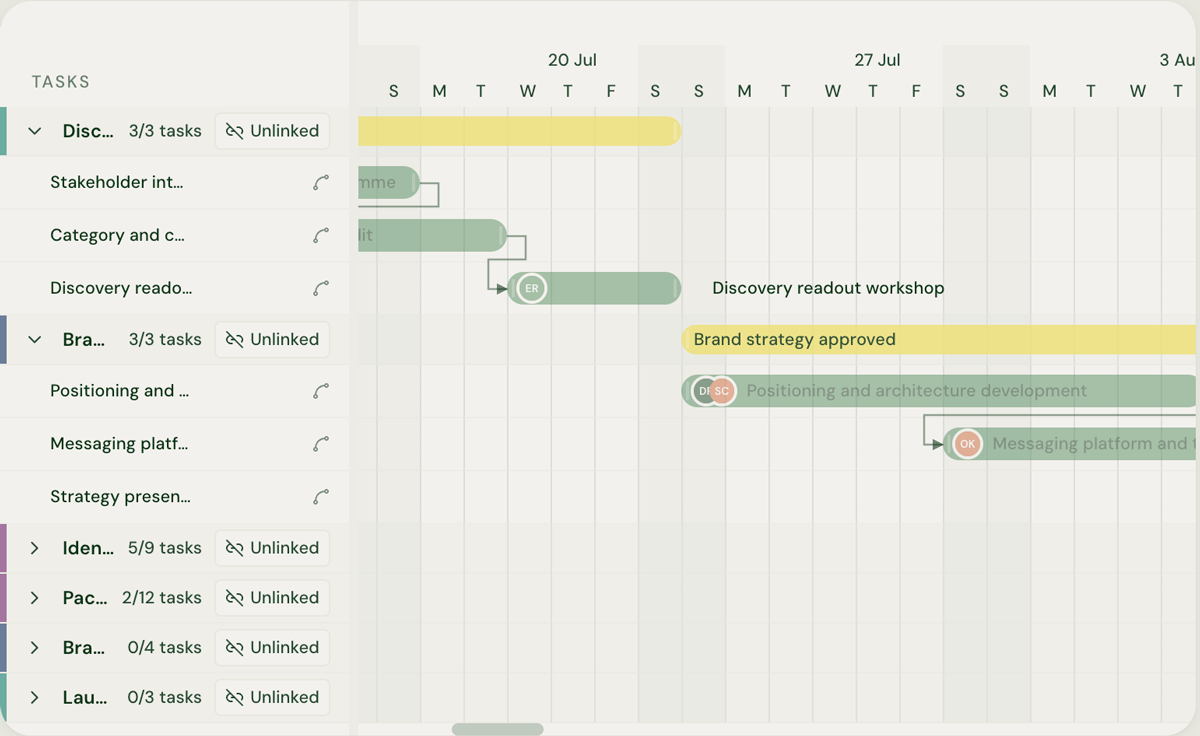
The next handover has somewhere to start
Shared tasks, milestones and recorded meeting context give the people involved a place to check progress and what is already in the project. Your PM can draft a status update from recorded work, then check and correct it before deciding what to communicate.
You will still need conversations about uncertain or missing details. The difference is that everyone does not have to begin by asking what is already recorded.
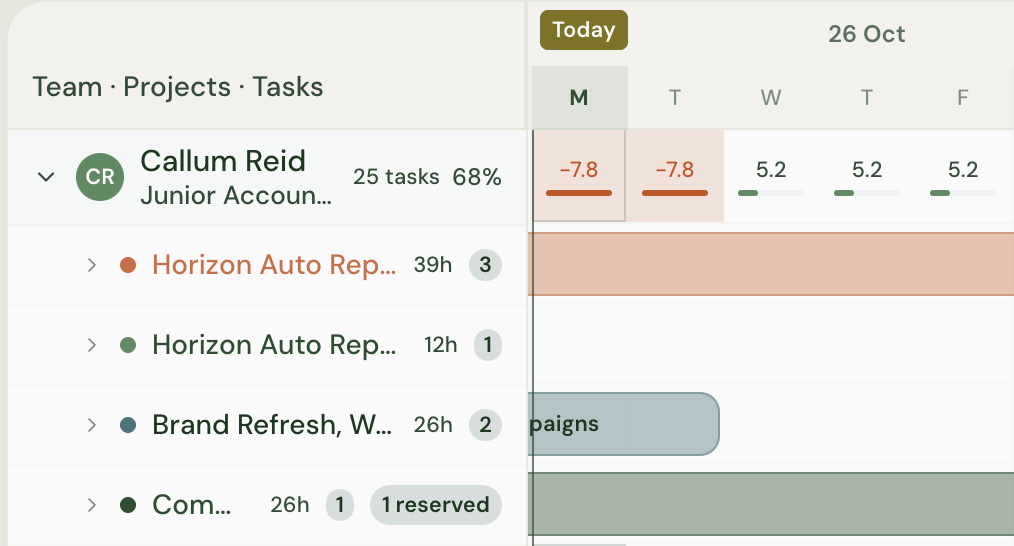
A full week can be discussed before another task is added
Aria shows overbooking warnings in scheduling and assignment views when bookings exceed available hours. The people planning work can review commitments and discuss capacity options with Aria Assistant.
That gives your PM or delivery lead something concrete to look at. It does not automatically reduce the workload, send a private wellbeing alert or decide whose commitment should move.
The tools that help during the working week

Project tasks and milestones
Use a shared project view to check the work and upcoming commitments you are involved in.

Time suggestions
Review suggested entries based on supported recorded activity, then correct what the clues cannot know.

Aria Assistant
Ask practical questions about the delivery information available to you, without turning every question into another update request.

Capacity and assignments
Give the people planning work a clearer view of booked hours and potential clashes.
Context from the tools your team already uses
Aria connects with GitHub, Gmail, Google Calendar, Outlook, Outlook Calendar and Fireflies.ai.
For developers, the GitHub integration brings development work into the wider project picture, helping the team manage it alongside milestones, capacity and other delivery commitments. Supported calendar and meeting records can also contribute through background updates, alongside project tasks and saved hours.

What is connected and who can see it depend on your organisation’s configuration and permissions. Check those arrangements with your team rather than assuming every calendar detail is private or every message is shared.
Be clear about what gets recorded and who sees it
You check the suggestions before saving and submit your own timesheet. Agency admins can inspect saved hours before submission, so saving a record and submitting a timesheet are different steps, not a promise of privacy until you press submit.
Aria does not collect screenshots, keystrokes or browsing activity. Booked capacity is a planning view, not a live reading of whether someone is busy or idle. The team still needs a clear agreement about permissions and how recorded time will be used.
Why that distinction matters
A new tool can arrive with a question about trust
In Raconteur and Attest’s 2024 survey of 1,000 workers, just over 80% said they felt monitored by their employer to a moderate or high degree. The published material does not state respondents’ country and covers workers generally, rather than agency delivery teams. (Raconteur and Attest, 2024)
Heavy workloads are worth discussing early
Among UK organisations reporting stress-related absence in CIPD’s 2025 research, 41% cited heavy workloads as a leading cause. It is an employer survey, not a finding that every full schedule causes illness or that Aria prevents it. (CIPD, 2025)
These findings explain why transparency and sensible workload discussions matter. They are not Aria customer outcomes or a measure of the people on your team.
Aria versus how the records get kept today
If you are comparing timesheet software for agency teams, look at the everyday workflow as well as the report the manager receives.
| Team task | Across separate tools | With Aria |
|---|---|---|
| Record the week | Reconstruct hours from calendar entries and memory | Check suggestions, add missing work, save and submit yourself |
| Pick up the next task | Search messages and ask for the current plan | Check shared tasks, milestones and recorded context within your access |
| Help the PM write an update | Re-explain work already recorded somewhere else | Give the PM project records and a draft to check, with questions for the gaps |
| Discuss competing commitments | Explain the conflict after both deadlines have been accepted | Review booked hours and overbooking warnings with the people planning work |
| Know who sees your time | Rely on assumptions about the tool | Understand that admins can inspect saved hours before submission |
Useful for the people asking for the update too
Your PM needs to understand progress and explain it to the client. Your delivery lead needs to know how commitments fit together. Useful records help those conversations, without treating every person as a status light.
For project managers
See Aria for project managersFor Heads of Delivery
See Aria for Heads of DeliveryCommon questions
Share this with your PM
If someone else chooses the team’s tools, send them this page with the part of the week you would most like to make easier.
See how it would work with your team
Bring a project, a timesheet or a week with competing commitments. We will show you the relevant Aria workflow, including what you check and who can see the saved record.
14 days to explore Aria · No credit card required · Cancel anytime
Read more
AI can draft a timesheet from your calendar and project activity, but it shouldn't be the one to submit it. Here's what a drafted timesheet looks like in practice, and why you stay the person who checks and corrects it before anything is sent.
Michael Gold · · 6 min read
Delivery teamsProject managersTimesheets and AIWhen status has to be rebuilt by hand and time logged after the fact, both turn into paperwork you fill in to prove you did the work. This piece looks at why that can feel like being watched, and how project managers can spend less time on client status updates without handing their judgement to a tool.
Michael Gold · · 12 min read
Project managersDelivery teamsStatus and reportingTimesheets and AIWhen a project goes wrong, the warning signs have usually been there for weeks, spread across different tools and only joined up when someone pulls a status report together by hand. Michael Gold explains why that keeps happening, and why even good delivery tools rarely make it easy to see what needs attention while there's still time to act. You'll also find out what it means for your role, and where to go next if you want to get into the detail.
Michael Gold · · 12 min read
Founders and CEOsHeads of DeliveryOperationsFinance leadersProject managersDelivery consultantsDelivery teamsMargin and profitabilityStatus and reporting