

Aria helps with the parts of client delivery people usually piece together by hand: recorded updates, a first status draft and suggestions for where to look next. It also calculates project health, costs and forecasts from the information recorded. You check the drafts and decide what to do with the recommendations.
There are three parts to it: what Aria helps you draft, what it calculates or recommends, and what you decide. This page goes through each, along with the information it uses.
Most questions about AI for agency delivery come down to two worries: is it watching the team, and is it quietly making calls that should belong to people? Both are fair questions to ask of any tool, including ours. The short version is that Aria is built to do the rebuilding, and to leave the deciding with you.
Aria drafts
- Timesheet suggestions
- Status updates
- A plan from your Statement of Work
Aria recommends
- Where work needs attention
- What a change affects
- Possible next moves
You decide
- Check the draft
- Approve the plan and submit your time
- Choose what happens next
On this page
What does Aria draft for you?
First versions for you to check, using information already recorded. A draft is somewhere to start, not a substitute for knowing what happened.
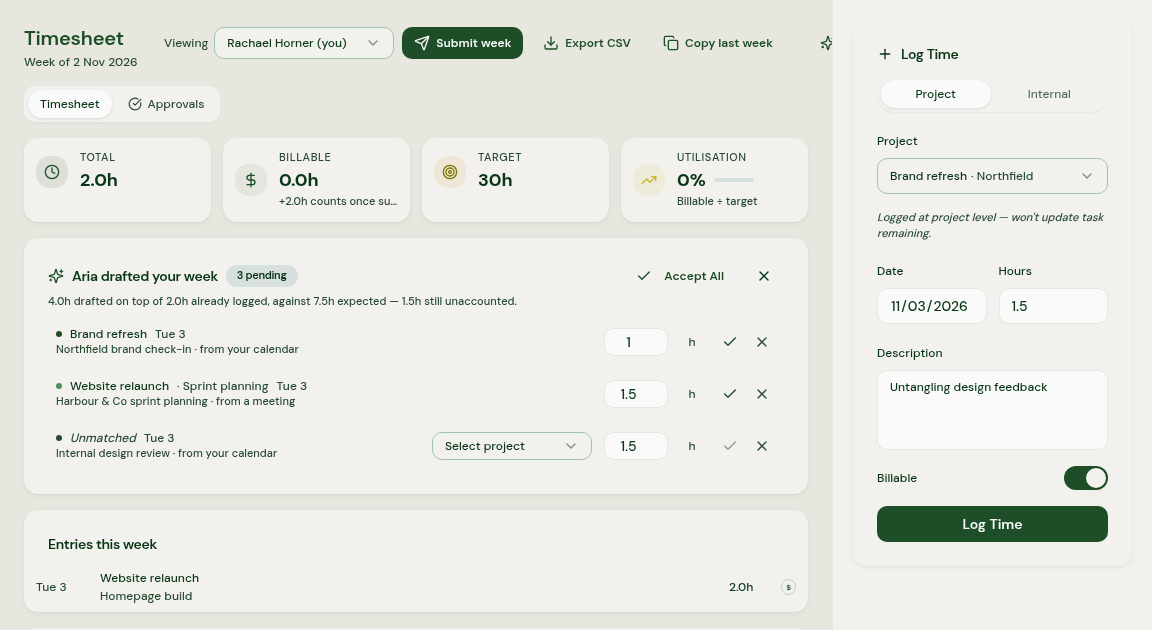
Your timesheet. Aria suggests entries from connected calendars, recorded meetings, assigned tasks and timers, with confidence indicators. You check and save the entries, then submit the timesheet yourself. Saved hours can be visible to agency admins before submission. What AI-drafted timesheets actually look like explains the steps.
Your Statement of Work. You can upload your Statement of Work and Aria proposes a delivery plan for you to review, with the agreed scope still attached once you approve it. If the plan drifts from what was sold, Aria flags it.
Status updates. Aria can draft an update from completed tasks, recent milestones, open risks and logged hours. The project manager checks the draft, corrects it and decides what the client needs to hear.
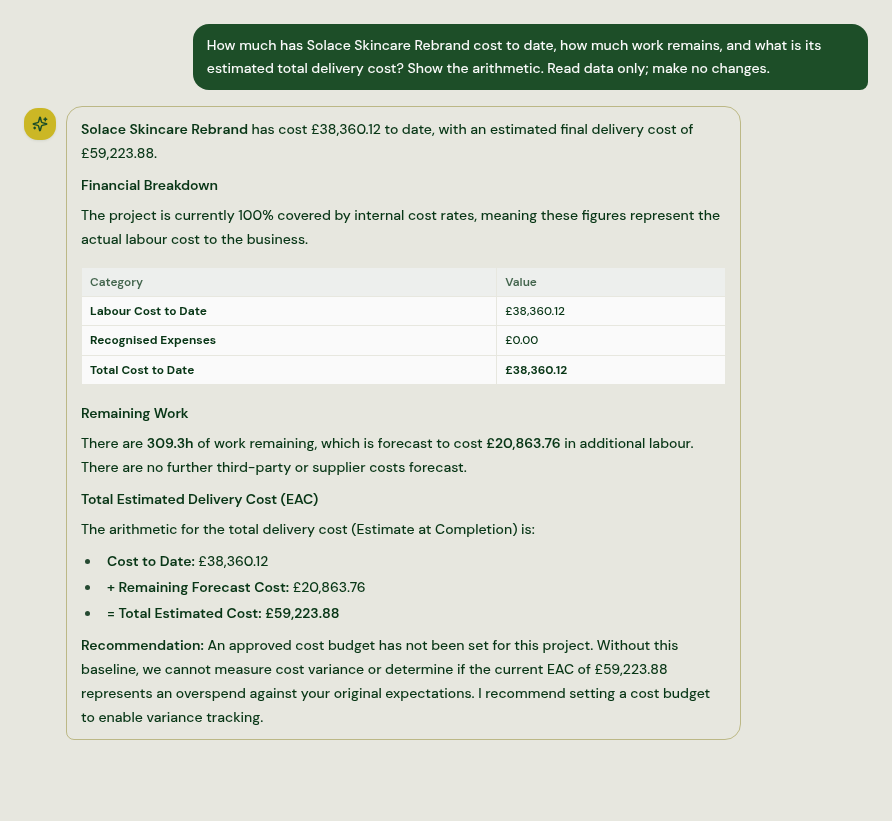
Answers to your questions. With Aria Assistant, you can ask in plain English about your delivery data, such as which projects need attention this week or who has room next month.
Every draft works the same way. The gathering and the first version are done for you, so your time goes on checking and deciding rather than reconstructing what happened.
What does Aria recommend, and how does it show why?
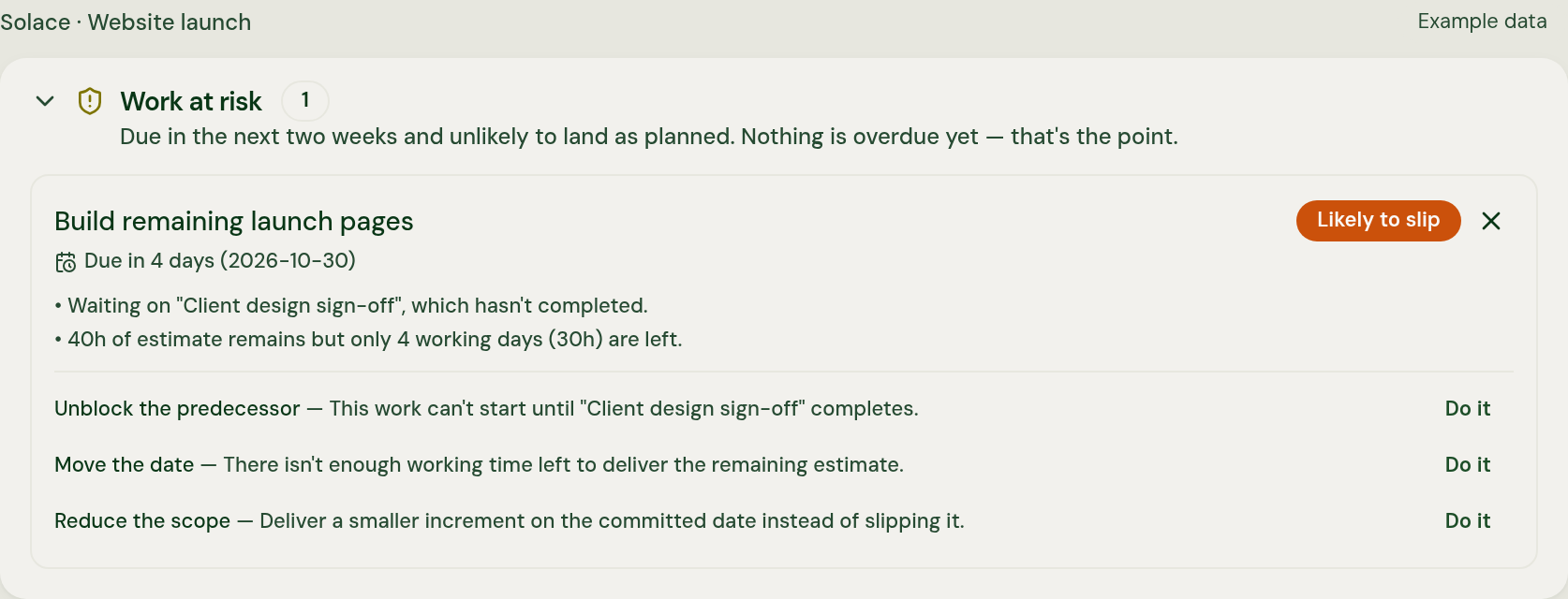
Where to look and what to do next. Aria spots what's slipping, shows the knock-on effect for delivery, people and margin and recommends a next move. When it flags a project, it explains why, so you're weighing up a reason rather than reacting to a colour.
Aria brings the connections into view and helps you decide where to look next. In practice, that means it can show you:
- who's about to be overbooked, including when one person is stretched while someone else has room to take more on
- where budget, costs and margin are heading on each project
- which dated or dependent work is at risk of slipping, and a calculated project health score with the reasoning behind it
A recommendation is a suggestion for you to weigh up. You can take it, change it or set it aside, and because Aria shows its reasoning, you can judge whether it fits what you know about the client and the team. You can also ask Aria Assistant about a flag in plain English if you want to dig into it.
Aria insights
20 open insights
Pack lead time threatens the December range-review deadline
Rhubarb Sanitiser Spray 100ml
Packaging lead time up to 12 weeks; place components PO immediately after Gate 2 or risk missing stock-into-warehouse by 14 Dec.
Priya Nair overallocated at 155% across technical reviews
Rhubarb Sanitiser Spray 100ml
Schedule slippage — Surface Spray — Citrus 750ml is 25% complete but 32% through its timeline
Surface Spray — Citrus 750ml
What’s huge about Aria is the proactive decision-making. It doesn’t just tell you where there’s a problem, you can ask it how to solve it. Where do we have capacity elsewhere? Can we shift this timeline to the left? How do we deliver more without adding people or sacrificing margin? For leaders making those calls every day, that's incredibly powerful.
Vice President Product Development, ex-Amazon · Advisor to Aria
What do you decide?
The decisions about the work, the client and what gets submitted. Aria can calculate a changing forecast automatically, but a calculation isn't a decision to change a plan.
That covers the decisions that matter in client delivery: whether to raise scope with a client, who works on what, what goes into a status update, when a timesheet is ready and whether a recommendation is right in the first place. Aria can make each of those easier to see. It doesn't make any of them for you.
That isn't a gap we're apologising for. It's how Aria is meant to work. The person accountable for a project knows things no system records, such as how a client is really feeling, what was said at the end of a call or which deadline can't move at all. Aria's job is to make sure they decide with the whole picture in front of them, while there's still time to act.
What won't Aria do on its own?
Aria helps you prepare and weigh up the options. It doesn't, on its own:
- submit your timesheet
- send anything to a client
- move people between projects
- make commercial calls on your behalf
Overbooking appears as a warning in scheduling and assignment views. It gives the person planning the work a reason to review the week; it isn't a direct email or Slack alert to whoever created the task.
If you're on the team side of this, how Aria works for delivery teams covers who sees your time, and why timesheets feel like surveillance looks at why so many tools end up feeling that way.
What does Aria's AI use?
What your business records and the accounts you connect. Aria uses project plans, tasks, logged time, budgets, costs and pipeline, alongside connected email, calendars and meeting records. Those integrations update in the background, so the picture depends on records being kept and connections continuing to work.
People connect their own email and calendars, while workspace tools such as Jira, Xero, Slack and Microsoft Teams are connected by an admin. Aria doesn't read Slack or Teams channels. Aria doesn't collect keystrokes, screenshots or browsing activity to build its view of the work.
So Aria works from the record of the work, not from watching people do it.
What happens when the data is incomplete?
Aria should say so, rather than fill the gap with a guess. A number built on half the information can look just as precise as one built on all of it, and that's how projects end up looking fine right up until they don't.
Michael Gold, our CEO and co-founder, makes the point in Things look fine until suddenly they don't: AI shouldn't manufacture certainty where the evidence doesn't exist, and if something can't be measured, it should say so. That's the principle Aria is built on.
Delivery predictions need enough recent logged time to show a useful pace. If that evidence isn't there, Aria explains why a prediction isn't available. Its delivery-confidence rating is separate from whether the financial inputs are complete.
Prediction details
Not enough data to forecast yet
Missing cost rates or commercial terms can make a margin impossible to measure. Aria marks that margin as not measurable and shows the reason, rather than presenting a reassuring number. Missing task estimates are shown as gaps too.
A gap you can see is a question you can ask while there's still time, whereas one hidden inside a confident number tends to turn up at the invoice.
Will AI replace your project managers?
No, and Aria isn't built to. What AI is good at in client delivery is the reconstruction: gathering what happened, joining it up and writing a first version. What it can't do is the judgement, and that's most of what makes a good project manager worth having.
The parts of the job that matter most are conversations: the scope discussion that's overdue, the client who needs reassuring, the person on the team who's quietly struggling. Those need someone who knows the people involved. What AI can take away is the part of the week spent rebuilding status and chasing updates before any of that can start.
Aria supports project managers, Heads of Delivery, COOs and consultants by reducing the time spent reconstructing the picture. Their work also includes leading teams, managing client relationships and helping people adopt better ways of working. Introducing software takes ownership, support and change management; the tool alone is only part of it. Aria vs a fractional COO or delivery consultant explains how they work together.