Aria for project managers

Spend less time rebuilding status and spot issues before they reach the client
Aria connects projects, people, time and money, helping you see what needs attention and giving you a status draft to review. Bring plans, recorded effort and delivery concerns into the same conversation, so an update starts from the work instead of another round of chasing. You decide what the client hears.
14 days to explore Aria · No credit card required
How Aria helps project managers
Start the update from recorded project activity, then spend your time checking what matters.
See dated or dependent work at risk and the reasons behind the project’s calculated health.
Give the team suggested time entries to check, with the review and submission still in their hands.
Your week changes with the work you manage

When you run the plan and the client conversation
A campaign needs approvals, revisions and several people’s time to line up. You need enough context to keep it moving without becoming the person who asks everyone for the same update twice.

When a dependency changes the next few weeks
An implementation hits a testing problem or a client decision arrives late. You need to check the plan, the people booked against it and what the revised commitment will mean for the client.
When you lead a bigger programme
There are more stakeholders and more reporting requests, but the useful questions remain practical: what is blocked, who needs to decide and which commitments need another look.
Sound familiar

You have collected the update but not had time to act on it
By the time you have gathered progress, checked hours and found out what the client agreed in the meeting, the report is due. The blocker you meant to deal with is still there.

The client change is real but the plan has not caught up
Another revision was agreed by email. The team is doing the work, the task board still reflects the original brief and the person due on the next project is no longer quite as available.

Friday asks you to remember a week that barely stood still
Meetings moved, tasks took longer and a quick favour became an afternoon. Now everyone is trying to reconstruct their hours while you are trying to explain where the project stands.
The problem is that delivery decisions and the records behind them keep drifting apart. A useful tool should help you run the work and make the necessary admin easier to maintain.
A better starting point for the next decision
Aria is agency management and PSA software for agencies and consultancy firms. It helps bring the project’s recorded activity, plan and capacity into view so you can spend more time managing what happens next.
The client update is due and the facts are spread everywhere
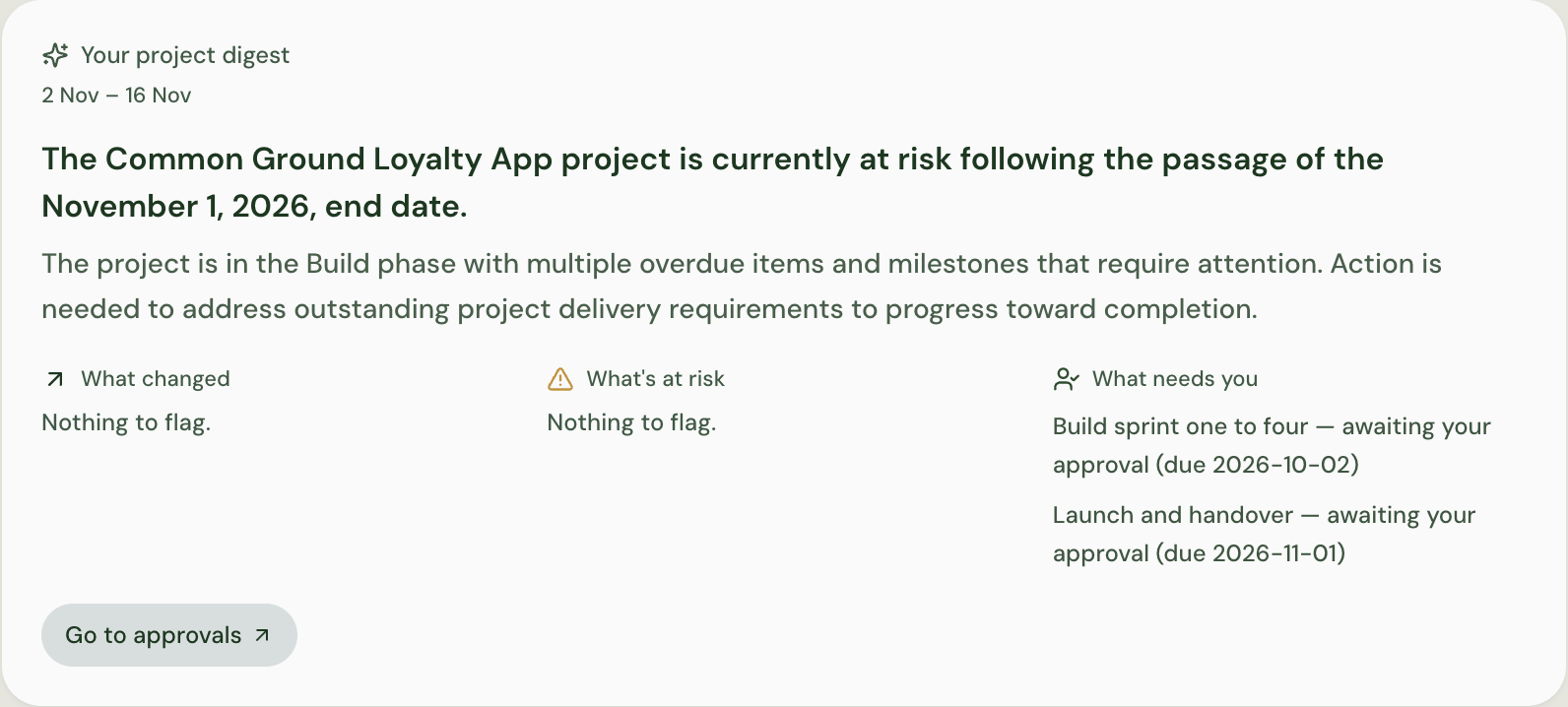
Aria can draft a status update from completed tasks, recent milestones, open risks and logged hours. You check the draft, add context and correct anything missing before deciding what to communicate.
That is useful status reporting for agency project managers because the starting point is the project record. It does not remove the need to confirm what happened or decide how a sensitive issue should be explained.
A late approval is about to become a delivery problem
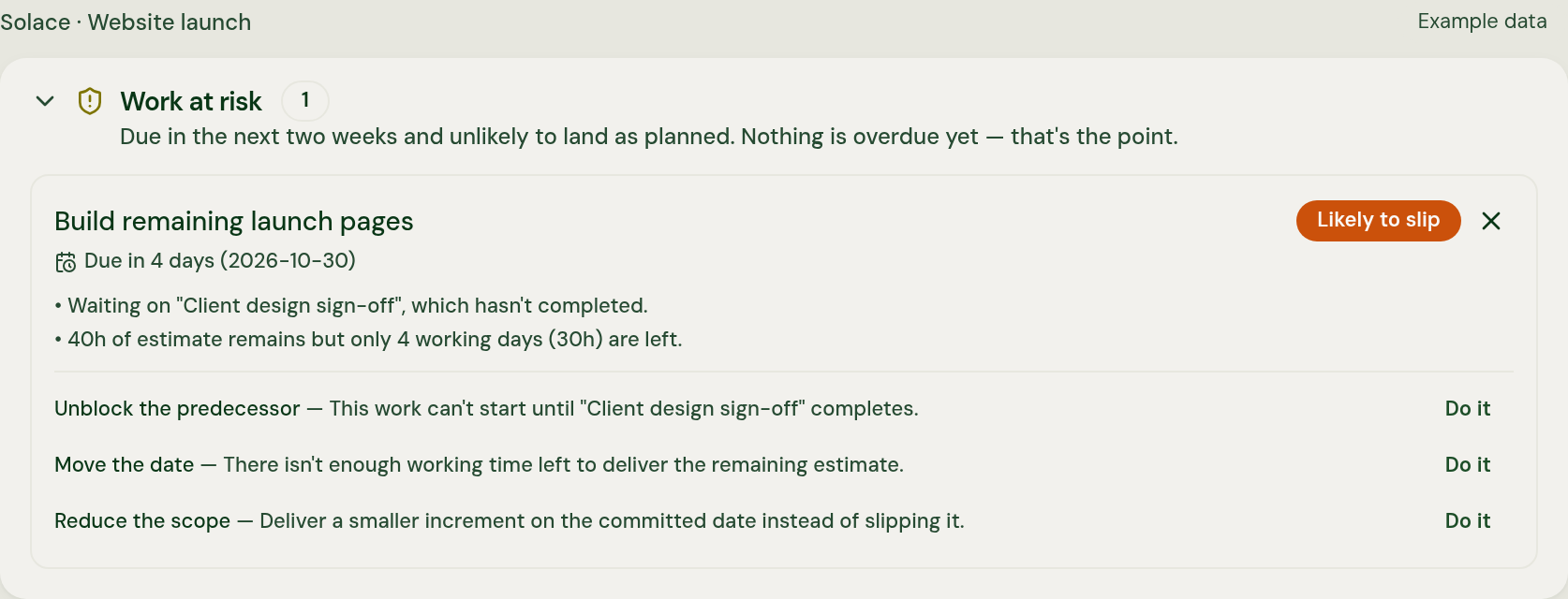
Work at risk highlights dated or dependent tasks where the plan shows a risk of slipping. The calculated project health brings together progress, overdue work, budget use and forecast margin, with its reasoning alongside it. Check whether the status has been manually overridden.
Use the explanation to investigate the next handover, discuss a revised commitment or ask for a decision. Aria Assistant can help you explore recorded project questions in plain English; it does not independently change dates or promise that every delay will be predicted.
The plan needs someone who is already booked elsewhere
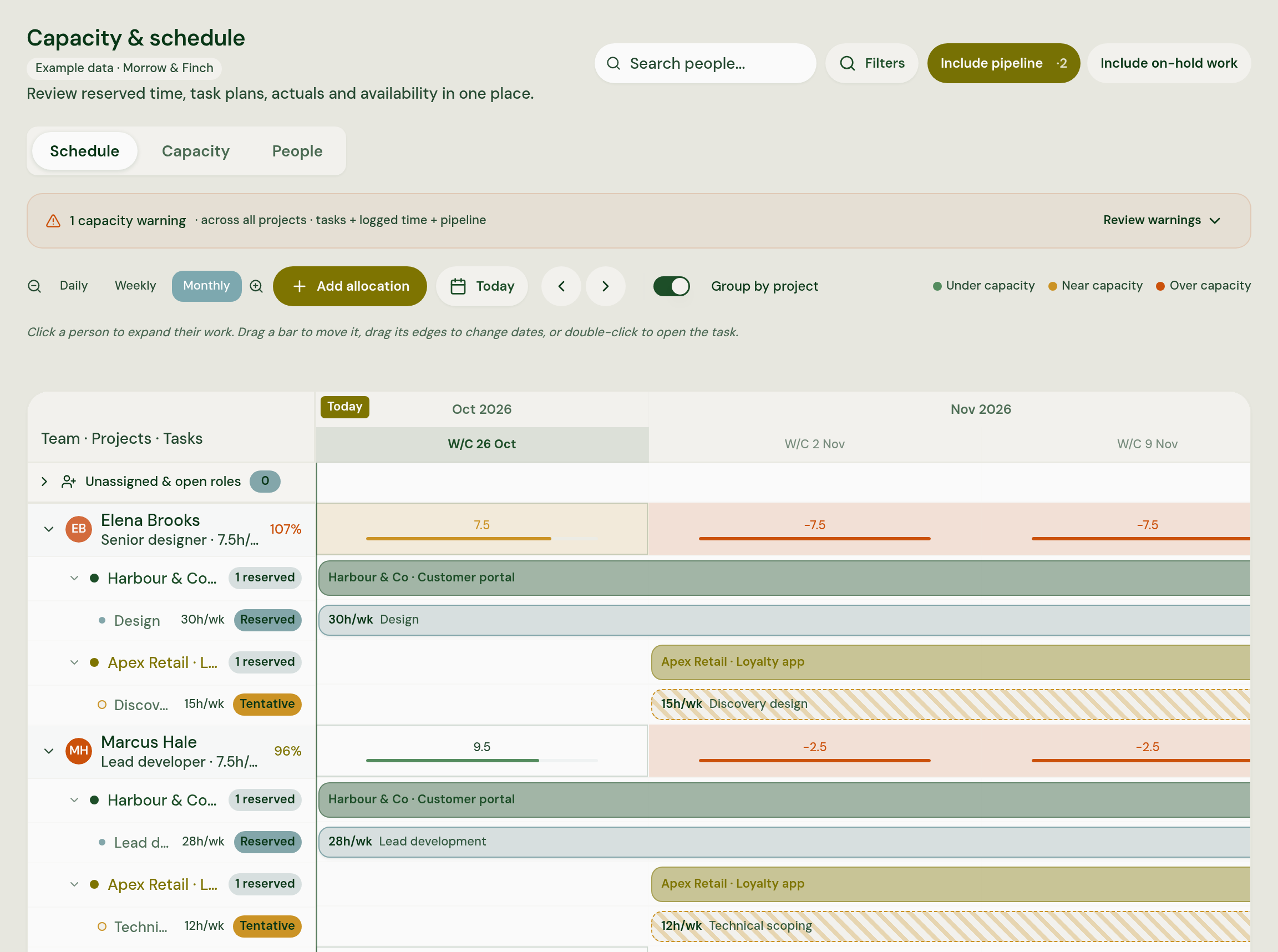
Review bookings and available hours before assuming the next task can simply move. Overbooking warnings appear in scheduling and assignment views, helping you raise the conflict with the person who can resolve it.
Recorded hours and project financial context also help make extra effort visible. Where agreed scope is recorded, potential additions can be flagged for a person to review. The PM and commercial owner still agree what changes and whether it is billable.
The tools that matter during a PM’s week

Project plans and tasks
Keep tasks and milestones in a shared project view so the next handover has a clear starting point.

Starting from the Statement of Work
Upload the agreed Statement of Work and review the plan Aria proposes, with milestones, tasks and people, before the team starts.

Status drafts
Review an update assembled from recorded tasks, milestones, risks and hours, then add the judgement the client needs.

Work at risk
Examine plan-based concerns and the calculated health explanation before choosing what needs attention.

Time suggestions
Let people check suggested entries from supported calendars, recorded meetings, tasks and timers before saving and submitting.

Resource planning
Look at booked time and available hours before discussing an assignment that clashes with other work.

Project financial context
Review recorded effort and financial information alongside the plan, rather than treating additional hours as someone else’s question.
Keep the context from the tools people use
Aria connects with Gmail, Google Calendar, Outlook, Outlook Calendar and Fireflies.ai. Supported calendar and meeting records can add context through background updates, alongside the tasks and hours recorded against projects.
The connection and permissions determine what is available. An email, meeting or calendar entry does not automatically establish what was agreed, how long the work took or what should be sent to the client.

Suggested entries your team can check
Aria suggests time entries from connected calendars, recorded meetings, assigned tasks and timers, with confidence indicators. People correct the hours, project or task, add missing work and save the record. Submitting the timesheet is their own separate step.
Agency admins can inspect saved hours before submission, so introduce the workflow honestly. The suggestions help people build the record; they are not a promise that saved time stays private until Friday.
What the client hears stays your call
You decide what is accurate, what needs escalating and how to explain it. A draft is a starting point, and a risk flag is a reason to investigate. Aria does not independently send a client update, submit someone’s timesheet, move staff or make commercial calls.
It does not collect screenshots, keystrokes or browsing activity. The purpose of the project picture is to help the people managing and doing the work have a more useful conversation about it.
The numbers behind the weekly pressure
72% manually collate status reports
Wellingtone’s 2026 research found that 72% of project professionals spent at least half a day a month manually collating status reports. The survey spans industries globally, rather than agency PMs alone. (Wellingtone, 2026)
81% say projects have become more complex
In PMI’s Pulse of the Profession 2026, 81% of surveyed project professionals reported increased project complexity in recent years. This measures their experience of change, not a rate of project failure. (Project Management Institute, 2026)
Workload matters beyond the next deadline
CIPD’s 2025 research found that, among organisations reporting stress-related absence, 41% cited heavy workloads as a leading cause. It reflects employer respondents’ views across the UK, not proof that overbooking causes illness or that a planning tool prevents it. (CIPD, 2025)
These are independent findings about work and reporting, not outcomes delivered by Aria.
Aria versus what you use now
Agency project manager tools often each contain a useful part of the picture. The effort comes from making them agree before you can explain the plan.
| PM task | Across separate tools | With Aria |
|---|---|---|
| Write the client update | Gather progress and hours, then draft from scratch | Review a draft from recorded tasks, milestones, risks and logged hours |
| Understand a delivery concern | Compare the task board with notes and a manually maintained status | Examine work-at-risk and calculated-health explanations |
| Check a staffing clash | Ask around and reconcile a resource sheet | Review bookings, available hours and overbooking warnings |
| Keep hours useful | Remind the team to reconstruct the week | Give people suggestions to correct, save and submit themselves |
| Decide what to tell the client | The project manager judges what matters | The project manager still judges what matters |
Common questions
Share this with your Head of Delivery
If your Head of Delivery or founder makes the decision about a new tool, send them this page with the project you would like to see in a walkthrough.
Bring the project that is taking too much chasing
We will look at the plan, the update you need to write and the information you are piecing together. See how Aria supports the parts of your week that keep getting pushed behind the paperwork.
14 days to explore Aria · No credit card required · Cancel anytime
Read more
When status has to be rebuilt by hand and time logged after the fact, both turn into paperwork you fill in to prove you did the work. This piece looks at why that can feel like being watched, and how project managers can spend less time on client status updates without handing their judgement to a tool.
Michael Gold · · 12 min read
Project managersDelivery teamsStatus and reportingTimesheets and AIAI can draft a timesheet from your calendar and project activity, but it shouldn't be the one to submit it. Here's what a drafted timesheet looks like in practice, and why you stay the person who checks and corrects it before anything is sent.
Michael Gold · · 6 min read
Delivery teamsProject managersTimesheets and AIWhen a project goes wrong, the warning signs have usually been there for weeks, spread across different tools and only joined up when someone pulls a status report together by hand. Michael Gold explains why that keeps happening, and why even good delivery tools rarely make it easy to see what needs attention while there's still time to act. You'll also find out what it means for your role, and where to go next if you want to get into the detail.
Michael Gold · · 12 min read
Founders and CEOsHeads of DeliveryOperationsFinance leadersProject managersDelivery consultantsDelivery teamsMargin and profitabilityStatus and reportingUK agency profit margins, project overruns, status reporting and more, each with its source, its sample and what to bear in mind before you quote it
· 20 min read
Founders and CEOsHeads of DeliveryOperationsFinance leadersProject managersDelivery consultantsDelivery teamsMargin and profitabilityStatus and reportingCapacity planningForecastingTimesheets and AI